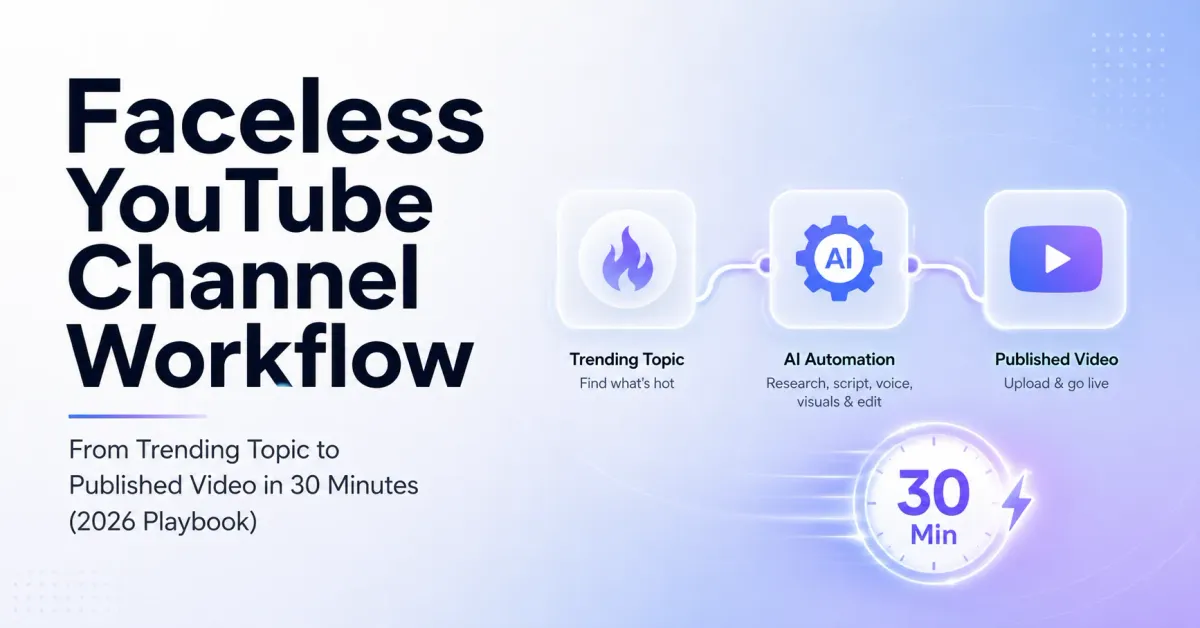
Faceless YouTube Channel Workflow: From Trending Topic to Published Video in 30 Minutes (2026 Playbook)
Last Updated: May 2026 | Reading Time: 15 min
Every faceless YouTube tutorial starts the same way. Choose a niche. Pick an AI tool. Write a script. Record a voiceover. Edit the video. Upload.
Simple enough on paper. Brutal in practice.
Because what nobody tells you is the real bottleneck isn't any single step. It's the space between them. The context switching. The tab juggling. The moment where you've finished writing a script in one tool, exported it, opened a different tool for voice, downloaded the audio, imported it into a third tool for video, waited, exported again, opened yet another tool for captions, and suddenly it's been two hours and you haven't even thought about a thumbnail.
That's how daily publishing dies. Not from a lack of ideas. From workflow friction.
This guide is the fix. One continuous workflow — trending topic to published video — built for creators who want to publish every day without burning out by week three. I'll walk through each step with real time stamps, so you can see exactly where the 30 minutes go.
Why the "stack of five tools" approach breaks at daily scale
Most faceless YouTube guides recommend a tool stack. ChatGPT for scripts. ElevenLabs for voice. CapCut or Pictory for video. Canva for thumbnails. TubeBuddy for SEO. Each tool is good at its job. The problem is the seams.
Every time you move from one tool to the next, you lose context. You're re-entering the same information. You're downloading, uploading, reformatting. You're managing five separate logins, five pricing plans, five update cycles. And the mental overhead of remembering which tool does what, where you saved last Tuesday's project, and whether you exported at the right settings quietly eats an hour you didn't notice losing.
For weekly publishing, this friction is tolerable. For daily publishing — which is where the algorithm rewards compound — it's a wall. Creator burnout research consistently shows that workflow complexity is one of the top contributors to exhaustion, right alongside creative fatigue and screen time. The fix isn't working harder inside each tool. It's reducing the number of tools.
The 30-minute workflow: overview
Here's where the time actually goes:
Minutes 0–5: Find and validate a trending topic. Minutes 5–12: Write a video script optimized for retention. Minutes 12–18: Generate the voiceover with natural delivery. Minutes 18–26: Generate the video with synced visuals. Minutes 26–30: Add metadata, thumbnail, and publish.
Five stages. One sitting. No exports, no imports, no tool switching. Let's break each one down.
Step 1: Find a trending topic that fits your niche (Minutes 0–5)
The single biggest time sink for daily creators isn't editing. It's deciding what to talk about. If you don't have a system for topic discovery, you'll spend 45 minutes scrolling Reddit, browsing YouTube comments, and checking Google Trends before you even open a script doc. That 45 minutes kills your daily habit faster than anything else.
A working topic discovery system has three components:
Speed. The system should surface 10+ ideas in under 3 minutes, not 30. You're picking from a menu, not cooking from scratch every morning.
Relevance. The topics need to match your niche. "Trending globally" means nothing if your channel covers personal finance and the trending topic is a celebrity breakup.
Timing. The best faceless content rides a trend early — not first (too risky), not late (too crowded), but during the rising window where search volume is climbing and competition hasn't saturated yet.
Where to find topics, ranked by speed:
Your platform's built-in trending tools come first, if your creation platform offers them. Echovox Studio has a smart trending topic finder that surfaces rising topics filtered by niche — that's the fastest path if you're already inside the platform for script and video. YouTube's Studio Trends tab is another option, though it requires separate login and manual filtering. Google Trends works for validation but is too broad for daily ideation. Reddit and Quora are gold for niche-specific angles but slow for daily use unless you've bookmarked specific subreddits.
The validation step matters. Before committing to a topic, check three things: Is someone already ranking for this exact title? (Search YouTube.) Is the search interest rising or flat? (Check Google Trends.) Can I add a unique angle? (If the answer is "no," skip it.)
This entire step should take 3–5 minutes. If it's taking longer, your discovery system needs tightening, not your discipline.
Step 2: Write a retention-optimized script (Minutes 5–12)
The script is 80% of your video's success. Good visuals with a bad script produce a video nobody finishes. A great script with mediocre visuals still holds viewers.
For faceless content, the script structure that consistently performs looks like this:
The hook (first 8 seconds). This is your make-or-break. Open with a specific claim, a surprising number, a direct question, or a pattern interrupt. Never open with "Hey guys, welcome back to my channel." That's a 40% drop in the first 5 seconds.
Examples of hooks that work for faceless content:
"This one setting costs faceless creators 30% of their viewers — and most never check it."
"YouTube just quietly changed its monetization rules for AI content. Here's what it means."
"I tested 12 AI voice tools for 60 days. Only three of them actually sounded human."
The body (main content). Structure it as 3–5 clear beats, not a continuous monologue. Each beat should be one idea, one supporting example, and one transition. The transitions are critical for retention — they tell the viewer why the next beat matters. "But here's where it gets interesting" works. Silence between sections does not.
The payoff. Deliver on the hook's promise. If you opened with a surprising claim, prove it. If you asked a question, answer it fully. Never end with "let me know in the comments" as your entire conclusion — that's a signal that the video had nothing left to say.
The CTA. One call to action, specific and low-friction. "Subscribe if you want the next part on Thursday" beats "smash like and subscribe and hit the bell."
Writing tips that specifically help AI voice delivery:
Keep sentences under 20 words. AI voices handle shorter sentences more naturally. Write the way people talk, not the way people write. Read each line aloud before finalizing. Add notes for emphasis and pauses directly in the script. Mark where the voice should slow down or speed up. Avoid idioms and slang that AI voices tend to mispronounce.
For daily publishing, you need to write this in 5–7 minutes. That sounds fast, but it's achievable once you internalize the structure. The structure itself does the heavy lifting — you're filling in a template, not writing from a blank page.
Step 3: Generate the voiceover (Minutes 12–18)
This is where most multi-tool workflows lose 20 minutes. You copy the script from your writing tool, open a separate voice tool, paste it in, select a voice, generate, listen, adjust, regenerate, export, download the file, and then import it into your video tool.
In a unified platform, you skip all of that. The script is already there. You select a voice, adjust pacing and emphasis directly on the script, and generate. The voice is ready inside the same project — no export, no download, no import.
What matters at this step, regardless of which tool you use:
Voice selection. Match the voice to your niche. Calm and authoritative for finance and education. Slightly faster and more energetic for tech and news commentary. Warmer and more conversational for lifestyle and storytelling. Don't use the same voice everyone else in your niche uses — differentiation matters.
Pacing. Default pacing is almost always too flat for YouTube. Slow down for key statistics, important claims, and new concepts. Speed up slightly for list segments and transitions. The variation is what keeps the ear engaged.
Breath and pauses. For anything longer than 90 seconds, add breath sounds. Insert longer pauses (700ms+) at section transitions. These two settings alone make a bigger difference than the voice model itself.
Pronunciation check. Listen to the first 30 seconds before generating the full voiceover. Catch mispronounced brand names, acronyms, or technical terms early.
This step should take 4–6 minutes, including one listen-through of the opening.
Step 4: Generate the video (Minutes 18–26)
The visual layer of a faceless video serves one purpose: keep the viewer's eyes occupied while their ears do the real work. That's it. You're not making a Pixar film. You're making sure no one looks away.
For daily publishing, the visual approach needs to balance quality with speed. Three formats that work reliably for faceless content:
Stock footage with motion. Relevant clips that change every 3–5 seconds. The change itself is what holds attention — static images cause the eye to wander and the thumb to scroll. Most AI video tools now auto-match footage to script content, which eliminates the manual "search for a clip, drag it to the timeline" loop.
AI-generated visuals. Text-to-image or text-to-video scenes that match the script's content. These work especially well for abstract topics (personal finance concepts, technology explanations) where stock footage would be generic.
Screen recording + overlay. For tutorials, software reviews, and "how-to" content. The screen is the visual. Add text overlays for emphasis.
In a single-platform workflow, the video generation step looks like this: the tool reads your script, matches visuals to each beat, syncs the voiceover, and assembles the video. You review, swap any visuals that don't fit, and approve. In a multi-tool workflow, this is where you'd spend 30–45 minutes stitching clips manually.
Captions are non-negotiable. Roughly 70% of social video is watched with sound off on mobile, and even on YouTube, captions improve retention by giving the brain two input channels (audio + text) instead of one. Auto-captions are fine for daily content — just scan them for errors on technical terms.
This step should take 6–8 minutes, including one full watch of the assembled video.
Step 5: Metadata, thumbnail, and publish (Minutes 26–30)
The last 4 minutes are housekeeping, but they directly affect whether anyone finds your video.
Title. Use your target keyword near the front. Add a curiosity hook or a specific number. Keep it under 60 characters so it doesn't get truncated on mobile. "5 AI Settings That Fix Robotic Voiceovers" beats "How to Use AI Voice Settings to Make Your Voiceovers Sound More Natural and Human-Like."
Description. First 2 lines are visible before the "show more" fold. Put your hook and target keyword there. Below the fold: a brief outline of what the video covers, any links or resources mentioned, and your standard channel CTA.
Tags. YouTube's own documentation says tags have minimal ranking impact compared to title and description. Spend 30 seconds on them, not 5 minutes. Use your primary keyword, 2–3 variations, and your channel name.
Thumbnail. For faceless channels, thumbnails carry even more weight because there's no familiar face to anchor recognition. Use bold text (4–6 words max), high-contrast colors, and an image that creates visual tension or curiosity. Canva templates work. The goal is a 5–8% click-through rate — anything above that and you're outperforming most channels in your niche.
Publishing time. YouTube Analytics tells you when your audience is online. Schedule for that window. If you don't have enough data yet, 2 PM–5 PM in your primary audience's time zone is a reasonable default.
Hit publish. You're done.
The math that makes daily publishing work
Here's why this workflow matters beyond the time savings.
YouTube's recommendation engine rewards two things above all: consistency and retention. A channel that publishes 5 days a week with 45% average retention will outgrow a channel that publishes once a week with 55% retention. The algorithm needs volume to learn which viewers respond to your content, and it needs frequency to keep testing.
A multi-tool workflow that takes 2–3 hours per video means daily publishing requires 10–15 hours per week on production alone. That's a part-time job on top of whatever else you're doing. It's not sustainable for a solo creator beyond a few weeks.
A 30-minute workflow means daily publishing costs 2.5 hours per week. That's achievable. That's sustainable. And that's where the compounding starts — the channel that publishes 20 videos per month learns 4x faster than the channel that publishes 5.
What about quality? Won't daily AI video look low-effort?
This is the right question to ask, and the honest answer is: it depends on what you're publishing.
Daily AI video works when the value is in the information, not the production. Finance explainers, news commentary, tech reviews, educational content, data breakdowns, top-10 lists, trend analysis — these formats reward useful information delivered clearly. Nobody watches a "What is compound interest?" video for its cinematography.
Daily AI video fails when the value is supposed to be in the craft itself. Travel vlogs, cooking shows, cinematic storytelling, music videos — these formats need production quality that AI can't yet deliver at daily speed without looking cheap.
Know which category your content falls into. If you're in the information category, daily AI video is a genuine competitive advantage. If you're in the craft category, publish weekly and invest the time in production quality.
YouTube's guidelines are also clear on this point: AI-generated content is eligible for full monetization as long as it provides genuine value and isn't mass-produced templated content. The distinction is between "AI-assisted creation" (human ideas, human editing decisions, AI execution) and "AI slop" (no human input, no unique perspective, pure volume play). The workflow in this guide is the first type.
The tool-stacking problem and the all-in-one alternative
I'll be direct about the product angle here, because it's relevant to the workflow.
The multi-tool stack — ChatGPT + ElevenLabs + CapCut + Canva + TubeBuddy — works. Millions of creators use it. If you already have that stack running and you're comfortable with it, there's no reason to switch.
But if you're starting fresh, or if you're hitting the 2-hour mark on every video and wondering why daily publishing feels impossible, the friction is the stack itself. Each tool is good. The transitions between them are what kills your time.
Echovox Studio was built specifically to eliminate those transitions. Trending topic discovery, AI scriptwriting, 250+ voices with natural pacing controls, voice cloning, text-to-video generation, and multi-language support — all in one place. No exports. No imports. No five-tab workflows. The 30-minute workflow in this guide is what it actually looks like inside the platform.
You can try the free tier at echovox Studio and test the full workflow on your first video. No credit card. If it's not faster than your current stack, go back to what works for you. No hard feelings.
A 7-day challenge to test this workflow
If you want to prove to yourself that daily publishing is achievable, try this:
Day 1: Set up your creation tool. Pick your niche. Generate your first video start to finish. Don't publish it — just time the workflow.
Day 2: Publish your first video. Don't agonize over the thumbnail. Ship it.
Day 3: Publish again. Focus on cutting your script-writing time. The structure should already feel familiar.
Day 4: Publish. Pay attention to your voiceover settings. Tweak pacing and emphasis based on what sounded flat on Day 3.
Day 5: Publish. Review your Day 2 video's analytics. Which parts had the highest retention? Write Day 5's script to lean into those patterns.
Day 6: Publish. Your workflow should now feel automatic. Note your total production time — it should be under 35 minutes.
Day 7: Publish. Review the week. Seven videos. If your total production time across all seven was under 4 hours, you've built a sustainable daily habit.
Most creators who complete this challenge say the same thing: "I didn't believe daily was possible until I actually did it for a week." The workflow is the unlocking factor, not motivation.
Frequently asked questions
How long does it take to make a faceless YouTube video with AI?
With a unified workflow (script, voice, and video in one platform), a complete faceless video takes 25–35 minutes from topic selection to upload. With a multi-tool stack (separate apps for script, voice, editing, and thumbnails), the same video typically takes 90 minutes to 3 hours due to export-import cycles and context switching between tools.
Can you publish faceless YouTube videos daily without burning out?
Yes, if your production workflow is under 35 minutes per video. The main cause of daily publishing burnout is workflow friction, not creative output. Creators who spend 2–3 hours per video cannot sustain daily publishing beyond a few weeks. Creators who stay under 35 minutes can publish 5–7 days per week indefinitely because the time commitment stays manageable alongside other work.
Does YouTube monetize AI-generated faceless videos?
YouTube allows full monetization of AI-generated content as long as it provides genuine value and isn't mass-produced low-effort content. The key factors are unique perspective, human editorial oversight, disclosure of synthetic media where required, and content that serves the viewer rather than just filling a publishing schedule. Faceless channels using AI as a production tool while adding original analysis, commentary, or educational value are fully eligible for the YouTube Partner Program.
What's the best AI tool for faceless YouTube videos in 2026?
There is no single best tool — it depends on your workflow preference. Multi-tool stacks (ChatGPT + ElevenLabs + CapCut) offer flexibility and individual best-in-class quality at each step. All-in-one platforms (like Echovox Studio, InVideo AI, or Pictory) prioritize speed and workflow continuity by keeping everything in one interface. For daily publishing, all-in-one platforms tend to save 60–90 minutes per video compared to multi-tool stacks.
How many videos should a new faceless channel publish per week?
Start with 3–5 videos per week for the first 90 days. Consistency matters more than volume in the early phase, because YouTube's algorithm needs regular uploads to learn which audiences respond to your content. Once you have 30+ videos and can identify which formats perform best, scale to daily if your workflow supports it. Publishing 2 or fewer videos per week makes it significantly harder to reach monetization thresholds within a reasonable timeframe.
What niches work best for daily faceless content?
Niches where the value is in the information, not the production quality. Personal finance, technology news and reviews, educational content, business analysis, health and wellness explainers, data-driven lists, and trend commentary all work well for daily AI-assisted faceless videos. Niches that depend on visual craft (travel, food, cinematography) are better suited to weekly publishing with higher production investment.
Final thought
The creators who publish daily aren't working harder. They're working through a shorter pipeline. Trend to script to voice to video to publish — one sitting, one tool, one habit.
If you're spending more than 45 minutes per video right now, the problem isn't your speed. It's the number of steps between your idea and your upload button. Compress the steps and the daily habit builds itself.
About this article: Written by the Echovox Studio team based on production data from thousands of creator workflows, 2026 YouTube monetization guidelines, and current research on creator burnout and AI content production. Last updated May 2026.